Kyle Seth Gray

Kyle Seth Gray's blog. Usually writing about tech, personal experience, but now leaning more towards health and fitness.

The New Lock Screen

With iOS 11, the lock screen has been a hot topic for debate. It differs from what we are all used to, and in some ways breaks a lot of our previously thought of ways in how iOS works.

Two years ago, with iOS 9, one of the biggest issues with the lock screen was Touch ID. Touch ID on the 6s was fast enough that it really made blowing past your notifications super easy.

Last year Apple solved that by changing the whole lock screen metaphor. In iOS 10, swipe to unlock was replaced by pressing the home button to unlock the screen. This made it so you could rest your home button on Touch ID, unlock the device, and then interact with your phone without clearing all of those notifications.

Now, with iOS 11, to help present more unity between the lock screen and its relation to your notifications, they've made the lock screen and Notification Center one and the same. Now, this has been confusing for a lot of people, especially since there were even some bugs at one point that locked the device when swiping down.

Bear with me, but this, to me, makes a lot of sense.

Take a look (with permission) at any close friend or family member's iOS device. Chances are:

  1. If you show them Notification Center they have no idea what it is

  2. Their Notification Center has notifications for dayyyyyyyyz

  3. They are used to using their lock screen to access notifications. That's where their texts/emails/facebook/game spam goes.

I can't tell you how many times most users don't even know about notification center. Swiping down from the top is completely foreign to them. But locking the device isn't. [Except for my parents, who notoriously put their devices in their pockets with the screen on (╯°□°)╯︵ ┻━┻]

If you asked any of them, or you know, did a survey/study group with people who use iOS devices, and asked them what would make sense to get to their notifications, it would be navigating to where they saw them in the first place: their lock screen.

For us "nerds" who actually use Notification Center hundreds of times a day? Yes, this new change is strange, and I still think that swiping to quickly dismiss a notification should at least be an option. But having one single pane ("The Cover Sheet") where we see all of our notifications, and can get an overview of what has pinged us/what's happened over the course of the day makes sense. I bet with this new change, more of us won't see the need to clear all of our notifications either. Mainly because the new notification center focuses on showing us recent notifications, and then we can scroll to see all of them. And then, if we really want to, we can dismiss all of them at once.

Federico Viticci on the latest episode of Connected at 24:00 made the most sense to me when it comes to this new lock screen. His theory is:

...Apple took at a bunch of analytics, realized people don't open Notification Center at all, and people don't open widgets at all…so they looked at stats for the lock screen, realized 'well people interact with notifications on the lock screen a lot so why not just make it like a lock screen?'


Overall, this is just my personal idea of how Apple went about making this change, and the possible reasoning behind it. It may not be 100% better or even close to being right, but to me this makes sense.
WWDC Scorecard!

WWDC was awesome.

So many awesome products got introduced, and there is a lot in iOS 11 to be excited about. I really feel like most of my little gripes or wants were addressed.

Number 1:

HEALTHKIT IN ICLOUD

hallelujah. That is my favorite new feature.

Somewhat related to that is iCloud iMessage syncing, which is a great solution not only to fix out of order messages on the Mac, but being able to have a new device and not have to restore from a backup, which used to be required for anything Messages/HealthKit related.

iOS got turned to 11, but macOS is still on 10.13.

Photos got its iCloud syncing for faces and objects, which is awesome.

Music is getting friend recommendations and I think more integration with online profiles.

iPad blew everything out of the water.


Activity got better, including enhanced messages when you reply to an Activity (which deep link to that user in Activity.app), there's more fun replies, and there's even more motivation to help people complete their rings.

Notification Center and Springboard got some touches, including the new drag and drop API coming to Springboard, and Notification Center being... rethought?

Overall I think this was a great year. We're seeing a lot of advances in hardware, software, and new features that will make iOS even better.

I can't wait until September.

And until next year. After a week in San Jose, it really did feel like Apple rented the city:

In San Jose, it feels like Apple set up a little city for developers—even a few blocks away, you felt like you were still at the conference.

WWDC Prediction and Wishes

WWDC IS HERE

Which means it's time to get excited and probably build up too much hype.

Regardless, I'd thought I'd try and compile of list of things I think are going to happen, and things I wish were happening:

Things I absolutely know are going to happen:

  • The Apple Watch will get ██████████

  • There will be a new █████████ API for ███████

  • Craig is going to demo ████████████

Predictions:

  • iOS and macOS get turnt to 11 🔥🔥🔥

  • Photos.app does what iPhoto used to do and syncs face data over iCloud.

  • Music.app adds user Profiles, shared playlists (viewable on someone's profile), and collaborative playlists. Beats had the first two in its streaming music service, and there were leaks earlier this year when a build of iTunes accidentally went out with a "Show Playlist on my Profile Page" checkbox, so I feel like this is coming.

  • iPad gets highlights, including upgrades to multitasking, differentiating software features, and maybe... maybe a calculator.

  • Siri expands its 'domains', including things like better calling/texting support, posting to various platforms, and being able to input data into note taking apps

  • iPad gets equivalent of 3D Touch - either by revamping the home screen to change some gestures, or through an API that allows the same actions to be just done by long pressing on iPad.

  • tvOS Siri gains parity with other platforms, i.e. hooking up to iMessage, being able to use Apps, and maybe even use Continuity to complete actions on other devices. This could be part of the whole Siri speaker thing if that happens.

  • Notification Center and Springboard on iOS gain more capabilities and possibly become more customizable.

  • More Workout modes on Apple Watch, (snowboarding, skiing, roller blading... basically anything that's in Health.app that's not in Workout.app)

  • Better Activity Sharing/Messages support. Like seeing a rich view of someone's latest workout, and not just the plain text that vaguely describes it. Or being able to pair with someone and accomplish the same workout over iMessage or Activity, competition wide. I'd go a step further and think about things like competitive events, but that might be a few years out.

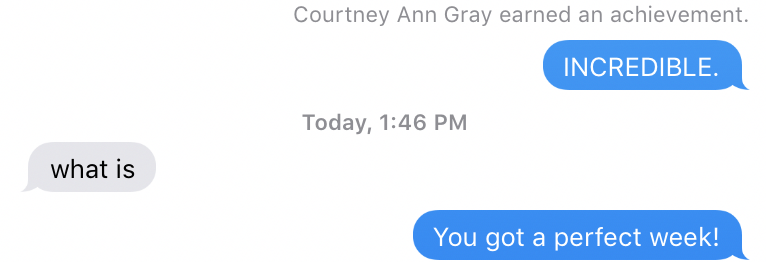
Exhibit A of why better notifications/rich support for Activity is needed:
Courtney texting about achievement

Wishes

  • I know I've um. said this before. But being able to export a health database from an old iPhone and bring it to a new iPhone, skipping iTunes or iCloud restore. Being able to back it up independently would help with a greater peace of mind, not only in case of catastrophe (iPhone goes into ocean but it was just backed up last night), but because I feel like there should be a better way to store a vitally important database. [And to keep those streaks]

  • Fruition of a few of the benefits of APFS. Maybe it comes to macOS, and possibly more storage savings are seen as a result of it.

  • Overall, hopefully a less glitchy experience when transferring restores between phones. Too often I've seen bugs get transferred over when restoring from an iCloud/iTunes backup. And there should be a more clear way to hopefully erase any of those errors while maintaining user data.

  • iCloud Profiles: This is somewhat of a vague idea, but I feel like with the recent addition of iCloud emphasis inside of the settings in iOS, why not use that data for a better user experience? i.e.: If I allow it, add my profile picture I set there to anyone in my Contacts contact card of me. Any phone numbers, addresses, emails, etc. I add could also be synced over. Obviously this would be a heavy user opt-in feature, but I think it could be pretty neat.

  • iTunes split up. I know everyone loves to bitch about iTunes. (I, for one, use it every day and have no issues with it). But I can agree that it's become a bloated app. Why do I need to open iTunes to collect diagnosis files from my iPhone? Why is there an App Store and a podcast directory all in the place where I listen to music? Having separate apps to do things with photos, buy movies, and download podcasts would make much more sense. And it would make it a lot simpler for the end user when they go to Music.app for Music, TV.app for their movies and shows, and Podcasts.app for their internet radios.